HPE Server Memory Upgrade Compatibility Guide
An HPE server memory upgrade is not a generic DIMM purchase. In enterprise environments, the correct module must match the server generation, processor family, memory channel design, firmware requirements, and intended workload. A module that physically fits may still run at a reduced speed, disable a memory configuration, or prevent the server from completing POST.
For procurement teams and infrastructure administrators, the objective is simple: add capacity without introducing a compatibility issue or reducing the performance of the installed memory estate. That requires confirming the exact server and processor configuration before selecting part numbers.
Start With the Exact HPE Server Platform
“HPE ProLiant” is a product family, not a memory specification. A DL360 Gen9, DL380 Gen10, and DL380 Gen11 can have very different memory architectures. Server generation is the first filter because it determines the supported DDR standard, DIMM form factor, processor platform, and maximum memory capacity.
Older HPE ProLiant Gen8 and Gen9 systems commonly use DDR3 or DDR4 memory, depending on the model. Gen10 platforms are generally associated with DDR4, while Gen11 systems use DDR5. These generations are not interchangeable. DDR4 and DDR5 DIMMs have different key positions, electrical requirements, and controller support. Forcing a cross-generation substitution is not possible and should not be attempted.
Record the full server model and generation from the chassis label, iLO inventory, BIOS, or existing asset documentation. Then verify the installed processor model. In dual-socket systems, the processor count matters because each CPU controls its own memory channels. Adding DIMMs only to slots associated with one processor can create an uneven memory configuration and limit capacity available to workloads scheduled on the other CPU.
Choose the Correct DIMM Technology
The next decision is not simply capacity. HPE servers may support registered DIMMs, load-reduced DIMMs, unbuffered DIMMs, persistent memory, or platform-specific memory options. Support depends on the server and processor family.
Registered DIMMs, usually identified as RDIMMs, are widely used in enterprise servers because they provide a practical balance of capacity, cost, and performance. Load-reduced DIMMs, or LRDIMMs, are designed for configurations that require larger memory footprints. They reduce electrical loading on the memory controller, allowing higher capacities per system in supported configurations.
RDIMMs and LRDIMMs generally cannot be mixed in the same server. Even when a system recognizes both technologies individually, mixing them can cause boot failures or unsupported configurations. The same caution applies to mixing standard DIMMs with 3DS LRDIMMs, Intel Optane persistent memory in applicable legacy platforms, or other specialized memory technologies.
HPE SmartMemory is designed and validated for specific HPE server platforms. It can provide advanced error handling, inventory visibility, and firmware-level compatibility benefits. Third-party enterprise memory may be appropriate for certain procurement strategies, but it must be matched precisely to the server specification. The trade-off is straightforward: a lower purchase price does not offset the cost of troubleshooting an unstable or unsupported production server.
HPE Server Memory Upgrade Capacity Is Only Half the Calculation
A 128 GB DIMM may be supported by a platform, but that does not mean it is the best choice for every upgrade. Capacity planning should consider the target workload, current utilization, future expansion, and the available memory channels.
Virtualization hosts often benefit from larger DIMMs because they need high total capacity while preserving empty slots for future growth. A database server may need both capacity and memory bandwidth, which can favor a larger number of lower-capacity DIMMs distributed evenly across channels. For example, six properly balanced DIMMs can deliver better bandwidth behavior than two large DIMMs, even if the total installed capacity is the same.
There is also a cost and expansion trade-off. Filling every slot with smaller modules can be economical for an immediate requirement but makes the next expansion more expensive. Installing higher-capacity modules now preserves slots, although the initial acquisition cost is higher. The right design depends on whether the server is expected to remain in service for several years or is supporting a shorter-term capacity requirement.
Follow the HPE Memory Population Rules
Memory population order is one of the most common causes of avoidable server configuration issues. HPE servers label memory slots by processor and channel, and their installation guides specify which slots must be populated first. These rules are not cosmetic. They determine whether the system can use its available memory channels efficiently.
In a typical multi-channel platform, install matched DIMMs symmetrically across the channels connected to each processor. If CPU 1 receives a DIMM in its first channel, CPU 2 should usually receive a matching DIMM in its corresponding first channel. When adding memory to an existing dual-processor server, review the current layout rather than assuming empty slots can be filled in numerical order.
A sound pre-installation check should confirm at least the following:
- The DIMM type, speed, rank, voltage, and capacity are supported by the server.
- New modules match the existing modules where a mixed configuration is not supported.
- DIMMs are distributed according to the processor and channel population diagram.
- The planned configuration stays within the maximum capacity supported by the server and installed CPUs.
- BIOS, iLO, and system firmware are at versions appropriate for the memory configuration.
Mixed DIMM capacities can be supported on many HPE platforms, but support does not always mean optimal performance. A mixed layout may place memory into less efficient channel arrangements or reduce the available interleaving behavior. For production virtualization, analytics, and database systems, symmetrical capacity per processor is usually the safer design target.
Verify Speed, Rank, and Processor Limits
Memory speed is negotiated across the server configuration. Installing faster DIMMs does not guarantee that they will operate at their rated frequency. The effective speed is limited by the slowest installed DIMM, the processor memory controller, the number of DIMMs per channel, and the platform firmware.
For instance, a server may support 3200 MT/s memory with one DIMM per channel but reduce operating speed when additional DIMMs are installed in the same channel. This is normal platform behavior, not necessarily a faulty module. Procurement specifications should therefore state the required operating configuration, not only the maximum speed printed on the DIMM label.
Rank configuration also matters. Single-rank, dual-rank, and quad-rank modules affect channel loading and supported population rules. A higher-rank DIMM can offer useful density, but it may impose limits when the server is fully populated. This is especially relevant when expanding older systems with limited channel capacity or when combining modules from different procurement batches.
Use Inventory Data Before Ordering
The most reliable upgrade process starts with existing hardware data. iLO provides valuable information about installed DIMM part numbers, slot locations, capacities, operating speeds, and health status. BIOS setup and operating system inventory tools can provide a second source of validation.
Capture the current DIMM layout before placing an order. The required information includes server model, serial number, processor model and quantity, installed memory part numbers, occupied slots, total capacity, and target capacity. If a replacement is needed because of a failed module, obtain the exact label information from the failed DIMM and compare it with the server inventory. Replacing one module with a technically different alternative can create an undesirable mixed-memory condition.
For organizations maintaining multiple HPE generations, keep memory procurement separated by platform. A stockroom label such as “HPE server RAM” is too broad. Labels should identify the server generation, DDR type, DIMM technology, capacity, speed, and compatible part family. This reduces the risk of sending DDR4 modules to a DDR5 deployment or mixing LRDIMMs with RDIMMs during a fast maintenance window.
Install and Validate During a Controlled Window
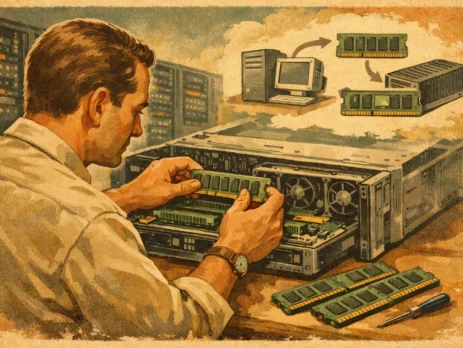
Power down the server according to HPE service procedures and use standard ESD controls. Install the DIMMs in the specified slots, confirm that each module is fully seated, and inspect the retaining clips before restoring power. Avoid moving working DIMMs unless the new population plan requires it, as unnecessary handling adds risk to a stable configuration.
After startup, review the POST messages, iLO Integrated Management Log, and system memory inventory. Confirm that the server recognizes the expected total capacity and that all modules report healthy status. Check the negotiated memory speed as well. A server that sees the correct capacity but has downclocked memory may still be operational, but the result should be evaluated against workload requirements.
Run the relevant platform diagnostics before returning the system to production. For virtualized hosts, confirm that the hypervisor recognizes the additional memory and that workload placement remains balanced across NUMA nodes. For database and application servers, monitor memory utilization, paging activity, and application response after the change.
A well-planned memory expansion extends the useful life of an HPE server without compromising its operating profile. Treat the upgrade as a platform-specific configuration task, verify each hardware variable before purchase, and preserve the final DIMM layout in the asset record for the next maintenance cycle.

I am an enthusiastic tech blogger with 15 years of experience in the technology field. I am passionate about sharing valuable insights and helping people who are interested in technology gain useful and practical information. I am originally from Mumbai, India.