Enterprise Network Example for Real IT Buying
When an IT team asks for an enterprise network example, they usually do not want a classroom diagram. They want a design they can price, source, support, and expand without creating compatibility problems six months later. For procurement teams, system integrators, and network admins, the useful version is one that maps business needs to actual hardware categories, redundancy decisions, and refresh paths.
A realistic enterprise network is less about drawing three boxes labeled core, distribution, and access, and more about deciding where performance, resilience, and cost need to meet. The right design for a 50-user office is not the same as the right design for a regional warehouse, healthcare group, or multi-floor corporate site. Still, most enterprise environments follow the same architectural logic, and that makes a practical example useful.
A practical enterprise network example
Consider a mid-sized company with one headquarters, 300 users, several VLANs, a server room, IP phones, wireless coverage across three floors, and a small disaster recovery site. The business runs cloud applications, a few on-prem systems, security cameras, and a growing number of remote connections. Uptime matters, but so does budget discipline.
In this enterprise network example, the design uses a collapsed core at the main site, stacked access switching at the edge, enterprise wireless with centralized management, dual WAN connectivity, and segmented traffic for users, voice, servers, guests, and IoT devices. That is a common balance point for organizations that need enterprise-grade performance without the overhead of a very large campus design.
Core and routing layer
At the main site, the network starts with a pair of high-performance Layer 3 switches or routing-capable switches in the server room. These devices handle inter-VLAN routing, default gateway functions, and high-speed uplinks to access layers and firewalls. In some environments, dedicated routers still make sense, especially when WAN complexity, MPLS, SD-WAN, or advanced edge services are involved. In others, multilayer switching is the better fit because east-west traffic inside the building matters more than branch routing complexity.
The core pair should be deployed with redundancy in mind. That usually means dual power supplies, hot-swappable fans where supported, link aggregation on critical uplinks, and a first-hop redundancy protocol for gateway availability. If the business has virtualization hosts, storage traffic, or high-density aggregation requirements, uplink speed selection becomes a procurement issue early. A design that looks fine on paper can fail quickly if access switches are limited to 1G uplinks while server and wireless demand push aggregate traffic far higher.
Access switching
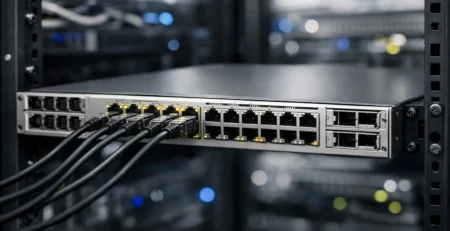
Each floor or wiring closet uses managed PoE or PoE+ access switches sized by port count, power budget, and uplink requirements. Users, phones, cameras, printers, and access points all terminate here. This is where many enterprise projects go wrong – buyers focus on port quantity but overlook power consumption, stacking support, module compatibility, and future endpoint growth.
For a 300-user office, access switching is often built around 24-port or 48-port switches, usually in stacks or virtual chassis configurations for simplified management and resilience. If wireless access points, IP phones, and cameras are all drawing power, the switch power budget needs to be calculated rather than assumed. A 48-port switch with PoE support is not automatically enough if the available wattage is too low for the actual device mix.
The access layer also enforces VLAN segmentation. A typical setup separates corporate users, voice, guest Wi-Fi, surveillance, printers, building systems, and server management interfaces. That separation improves security and makes troubleshooting more predictable. It also affects switch feature requirements, because policy enforcement, QoS behavior, and trunk capacity all become part of the design.
Wireless in an enterprise network example
Wireless is no longer a secondary layer. In many offices, it carries a large share of production traffic, and in some environments it is the primary user access method. In this enterprise network example, each floor has centrally managed indoor access points with overlapping coverage for roaming, plus a wireless controller or controller-based management platform depending on the vendor architecture.
The important design variable is not just the number of access points. It is client density, application behavior, and spectrum planning. A conference-heavy floor with video calls has different requirements than a warehouse area with scanners and light data traffic. Procurement decisions should account for Wi-Fi standard support, antenna type, controller compatibility, licensing impact, and PoE draw.
This is also where refresh cycles matter. Some businesses only replace failed units. Others standardize by generation to simplify management and support. Both approaches can work, but mixed wireless estates usually create more planning overhead, especially when software support and controller limits come into play.
WAN edge and security
At the perimeter, the company uses dual ISP links terminated on edge routing and security infrastructure. Depending on policy, that could mean dedicated routers ahead of next-generation firewalls, or integrated edge designs where routing and security functions are closely coupled. The right answer depends on throughput, failover expectations, VPN scale, and inspection requirements.
For many businesses, the WAN edge is where bandwidth assumptions get tested. A company may have adequate internal switching but poor user experience because security inspection, VPN termination, or branch traffic saturates firewall interfaces. That is why a sound enterprise design evaluates forwarding performance under real services, not just interface speed labels.
If the company connects to a DR site or branch offices, link resilience and routing policy need to be defined clearly. Static failover may be enough for a small environment. Dynamic routing is better when multiple sites, path preferences, and changing traffic patterns are involved.
Server room and data center connectivity
Even businesses with strong cloud adoption usually keep some on-prem infrastructure. In this example, the server room hosts virtualization, file services, backup systems, and identity infrastructure. Those systems connect through redundant top-of-rack or end-of-row switching, with uplinks back to the core pair.
This part of the design often drives transceiver, module, and cabling decisions that get overlooked in early budgeting. A switch may support the needed throughput, but the final bill changes once fiber type, optics, DAC cables, stacking modules, and spare power supplies are added. For technical buyers, that is not a minor detail. It determines whether the delivered hardware is deployment-ready or still missing critical components.
Management and monitoring
An enterprise network is only as manageable as its visibility. In practice, this means centralized monitoring, configuration backup, logging, SNMP or telemetry collection, and alerting tied to interfaces, power events, and environmental conditions where relevant. It does not need to be elaborate, but it does need to exist.
This requirement also shapes hardware selection. Some older platforms remain useful for basic connectivity, but they may be a poor fit if the business now expects stronger automation support, better API access, or improved security telemetry. Legacy procurement can be smart when exact compatibility is needed, but only if the operational trade-off is understood in advance.
How this enterprise network example translates to purchasing
For buyers, the main value of an enterprise network example is not the diagram itself. It is the bill of materials logic behind it. A complete network purchase usually includes switches, routers, access points, controllers where required, power supplies, uplink modules, transceivers, stacking accessories, memory or flash components for certain platforms, and software or licensing aligned to the deployment model.
That is why category depth matters. A sourcing issue is rarely limited to the primary chassis. More often, the delay comes from a missing module, an incompatible power supply, or a wireless management dependency discovered too late. Exact part matching is especially important in phased upgrades, where new hardware must coexist with an installed base instead of replacing it all at once.
Vendor choice also depends on the environment. Cisco and Huawei are both common in enterprise deployments, but the better fit depends on the customer’s installed base, operating model, support preference, and regional procurement constraints. Standardization reduces complexity, but mixed environments can be practical when budget, availability, or legacy interoperability are part of the equation.
For organizations sourcing at scale, supplier capability becomes part of network risk management. Hardware availability, regional fulfillment, replacement lead times, and access to both current and legacy product lines affect outage exposure as much as the design itself. This is where a specialized infrastructure supplier such as Gear Net Technologies LLC can be useful, particularly when a project depends on exact networking categories rather than broad IT distribution.
The best enterprise network design is rarely the most complex one. It is the one that fits the site, supports the applications, leaves room for growth, and can still be maintained when the original project team has moved on. If you are evaluating your next buildout or refresh, start with the traffic, the failure points, and the parts you will actually need on hand when something breaks.