
100% Genuine Hardware Supplier
Direct access to authentic Cisco, Fortinet, HPE, Dell, and Aruba networking hardware with full manufacturer warranties across Dubai & UAE.
No customer reviews yet
$14,490.00 Original price was: $14,490.00.$4,030.00Current price is: $4,030.00.
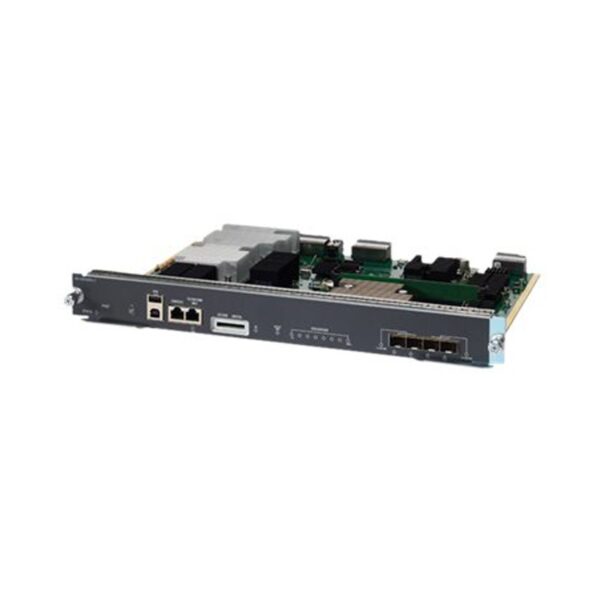
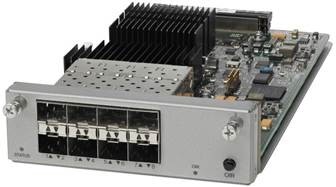
| Model: | WS-X45-SUP8L-E= – Cisco Catalyst 4500-X Switch Module |
| Detail: | Catalyst 4500 E-Series Supervisor 8L-E, Spare |
GNTME · PRODUCT ENQUIRY
Send your quantity, delivery destination and required configuration. Ask us to confirm availability, condition and warranty in your quotation.
Buying several items? Include your model list in the enquiry.
WS-X45-SUP8L-E= Specification | |
Feature | |
STATUS LED | The status LED indicates the current health of the supervisor engine and the current software state. |
RESET switch (recessed) | The RESET switch is used to reset and restart the switch. |
UID LED and switch combination | A combination push button switch and LED indicator. The blue LED can be turned on either by pressing the UID switch on the front panel or through software. The main purpose of the beacon LED is to enable identification from a remote location during configuration or troubleshooting. The ability to turn on/off the LED by pressing a switch allows you to walk to the other side of a fully populated rack and identify the switch. Pressing the blue beacon LED switch toggles the beacon LED on and off. |
USB ports | USB ports are supported. |
CONSOLE port (RJ-45 connector) | This is a 10/100/1000 port that uses an RJ-45 connector. The console port allows you to access the switch either locally (with a console terminal) or through a modem (remote). The port has an RJ-45 connector. The console port allows you to perform the following functions: Configure the switch from the CLI Monitor network statistics and errors Configure SNMP agent parameters |
10/100/1000 MGT port (RJ-45 connector) | The Ethernet management port is a Layer 3 host port to which you can connect a PC. You can use the Ethernet management port instead of the switch console port for network management. When managing a switch, connect the PC to the Ethernet management port on a Catalyst 4500 E-series switch. |
LINK LED (Management port) | The 10/100/1000 MGT port has a link LED associated with it. |
SECURE DIGITAL slot | A standard Secure Data (SD) memory card interface is provided on the front panel. |
SD LED | The SD LED indicates the current status of the SD memory card slot. |
ACTIVE SUP LED | The active supervisor engine LED indicates whether the supervisor engine is active or in standby mode in redundant supervisor engine configurations. |
UTILIZATION LEDs | Eight LEDs indicate (as an approximate percentage) the current traffic load over the backplane. |
1G/10G UPLINKS (SFP/SFP+) ports . | The Supervisor Engine 8L-E has four 1-G or 10-G ports that use either small form-factor pluggable (SFP) transceivers or SFP+ transceivers. |
Uplink port LEDs | The uplink port LEDs display the status and activity of the uplink ports. |
Supervisor Engine 8L-E Front Panel LEDs—Color and Meaning | |
STATUS | Indicates the status of the Supervisor Engine: Green—All diagniostic tests have passed. Orange—System boot or a diagnostic test is in progress. Red—A diagnostic test failed. Off—The supervisor engine is disabled or is not powered up. |
LINK | Indicates the status of the 10/100/1000 BASE-T Ethernet management port: Green—The link is operational. Off—No signal is detected, or there is a link configuration failure, or the link is disabled by user. |
SD | Indicates the status of the secure digital port: Green—SD card is inserted. Off—SD card has been removed, or the SD card is bad. |
ACTIVE SUP | Indicates whether the Supervisor Engine is active or in standby mode: Green—Supervisor engine is active (in redundant supervisor engine configurations) Off—Supervisor engine is in standby mode (in redundant supervisor engine configurations) |
UTILIZATION | When the switch is operational, the eight utilization LEDs indicate the current traffic load over the backplane as an approximate percentage value. Each LED-lit green indicates approximately 12.5 percent of load. |
Uplink port status | Indicates the status of the uplink port: Green—The link is operational. Orange—The link is disabled by user. Flashing orange—The power-on self-test indicates a faulty port. Off—No signal is detected or there is a link configuration failure. |
Uplink port active | Two LEDs on the front panel show the uplink port activity: 1-2 ACTIVE indicates that ports 1 and 2 are active 3-4 ACTIVE indicates that ports 3 and 4 are active In standalone supervisor engine configurations, all four uplink ports are active; all of the ACTIVE LEDs are lit green. In redundant supervisor engine configurations, only the 1-2 ACTIVE LED is lit green. |
Direct access to authentic Cisco, Fortinet, HPE, Dell, and Aruba networking hardware with full manufacturer warranties across Dubai & UAE.
Headquartered with central distribution warehouses in Dubai, enabling same-day local dispatch across UAE and express delivery to GCC & MEA hubs.
Zero grey-market risk. Every router, switch, and firewall undergoes strict physical testing and serial verification before leaving our Dubai facility.
In-house certified network architects in Dubai offering expert pre-sales solution design, BOQ validation, and post-deployment technical support.
Direct global supply chain relationships allow us to deliver aggressive bulk pricing and high profit margins for UAE system integrators and IT contractors.
Ready-to-ship inventory in Dubai covering core routers, enterprise servers, next-generation firewalls, and high-performance SAN storage.
Reviews
There are no reviews yet.