Buy Cisco ISR Router for Business Networks
When you need to buy Cisco ISR router hardware, the purchase usually sits inside a larger operational problem. A branch office is opening on a deadline, an aging edge router is failing, SD-WAN planning is underway, or a legacy ISR platform has become a support risk. In each case, the right decision depends less on brand recognition and more on fit – throughput, interface density, licensing, security requirements, and lifecycle status all matter.
Cisco Integrated Services Routers remain a standard choice for enterprise branch routing because they combine WAN connectivity, security services, VPN capability, and modular expansion in a single platform. That makes them practical for distributed businesses, managed service providers, and integrators standardizing branch infrastructure. It also means buyers need to be precise. ISR is a family, not a single product, and selecting the wrong model can create unnecessary cost or leave no room for growth.
What to check before you buy Cisco ISR router models
The first question is not whether you need an ISR. It is which ISR generation matches the site requirement. Buyers typically compare ISR 800, 900, 1000, 4000 Series, or legacy 1900, 2900, and 3900 platforms depending on deployment age and business need. A small remote office with limited users and simple WAN requirements will not be sized the same way as a branch handling voice, security inspection, and application traffic over multiple uplinks.
Throughput should be evaluated in real conditions, not only from headline numbers. Encrypted traffic, SD-WAN services, firewall functions, and concurrent VPN sessions all affect performance. If the router is expected to terminate IPsec tunnels, run advanced security features, and support future bandwidth upgrades, headroom matters. Buying only for current traffic can shorten the useful life of the platform.
Interface requirements are equally important. Some deployments need integrated Ethernet ports, while others require modular WAN interfaces, LTE backup, serial connectivity for legacy environments, or expansion for voice and unified communications. Cisco ISR platforms vary significantly in port layout and module support. Procurement teams should confirm exactly which WAN and LAN interfaces are needed at day one and which may be added later.
Cisco ISR families and where they fit
Cisco ISR 1000 Series routers are often considered for small branches, retail sites, and remote offices where space efficiency and branch-grade routing are the priority. They can be a strong fit when you need secure WAN access without the cost profile of a larger modular platform. They are not always the right answer for sites that may require extensive service expansion.
Cisco ISR 4000 Series routers are the more common option for mid-sized and enterprise branch deployments. Models such as the 4321, 4331, 4351, 4431, and 4451 support a broader set of enterprise services and modularity. These platforms are frequently used where IT teams need application visibility, stronger security integration, multiple WAN options, and room for interface growth. For organizations standardizing branch architecture, the 4000 Series usually deserves close attention.
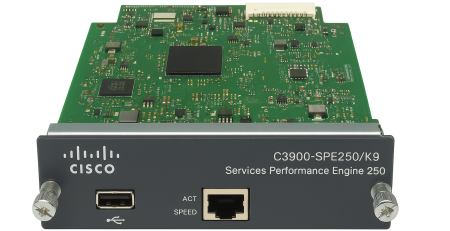
Legacy ISR G2 models including the 1900, 2900, and 3900 Series still appear in replacement cycles and compatibility-driven purchases. In some environments, they remain necessary because a business is maintaining an existing branch design, matching installed modules, or replacing failed equipment without redesigning the site. That can be valid, but buyers should weigh supportability, software availability, and long-term migration plans before committing to older hardware.
Licensing, software, and support can change the real cost
Many router purchases are delayed not by hardware selection, but by licensing confusion. Cisco ISR deployments may involve feature licenses for security, application services, voice, or SD-WAN functionality depending on the model and software track. If the router is being added into an existing standardized environment, procurement should confirm not just the chassis but also the exact license level required for the intended use.
This is where a lower hardware price can become misleading. A router that appears cost-effective may still require additional software entitlement or feature activation to meet the site design. The opposite can also happen – an organization may overbuy capabilities it will never use. The cleanest purchasing process starts with a defined use case: branch edge routing, VPN aggregation, unified communications support, cloud connectivity, or failover WAN. Once that is clear, the hardware and software stack can be matched properly.
Support expectations also matter. Some buyers need current-generation equipment for active support alignment and standardized maintenance contracts. Others need a fast replacement unit for a noncritical legacy branch where continuity matters more than refresh timing. Those are different procurement scenarios, and they should be treated differently.
New, replacement, or expansion purchase
If you are planning a new deployment, the focus should be sizing for the next three to five years. That includes user growth, bandwidth expansion, cloud traffic patterns, and whether security functions will stay on-box or shift elsewhere. A router that is correctly sized for a new branch should not need immediate replacement because encryption overhead or multi-service processing was underestimated.
For replacement purchases, compatibility becomes more important. Existing modules, rack space, power conditions, WAN handoff types, and branch templates often limit what can be changed quickly. In urgent failure scenarios, many organizations need the nearest functional equivalent rather than a clean-sheet redesign. That is why exact part matching and model-family familiarity are important in infrastructure procurement.
Expansion purchases sit somewhere in between. You may already have a standardized ISR estate and simply need additional units to support branch rollouts, regional growth, or project-based implementation. In that case, consistency may outweigh any marginal benefit from switching platforms. Keeping a common router family across sites simplifies sparing, operational training, and configuration management.
How to avoid common buying mistakes
The most common mistake is treating Cisco ISR routers as interchangeable. They are not. Similar model names can still differ in throughput licensing, interface options, module compatibility, and lifecycle standing. A procurement request should include the full part reference wherever possible, not just the family name.
Another frequent issue is ignoring module and accessory dependencies. A branch router may require the right power supply, rack mount kit, NIM card, SFPs, memory, or flash configuration to match the deployment. Buying the base chassis alone can create delays if the site design depends on add-on hardware that was not captured in the original request.
There is also a timing mistake that affects many enterprise buyers: waiting until a branch outage to verify sourcing options. For active environments with known legacy dependencies, it is often smarter to identify approved replacement models in advance. That reduces procurement friction during failure events and helps maintain service continuity.
Buy Cisco ISR router hardware with procurement accuracy
Technical buyers rarely need broad marketing claims. They need to know whether a supplier can provide the exact router family, associated modules, and purchasing support required for the deployment. That is especially true for mixed environments where current and legacy Cisco platforms coexist, or where regional fulfillment and export capability are part of the buying process.
For business purchasers, the strongest sourcing partner is one that understands the difference between a branch refresh, a maintenance replacement, and a scale-out order. The conversation should quickly move into model numbers, compatibility, lead time, and deployment context. If a router purchase includes modules, power components, interface cards, wireless integration, or related network hardware, coordinated procurement becomes more efficient than sourcing each item separately.
This is also where inventory depth matters. Enterprise networking projects often involve exact hardware categories rather than broad product classes. A buyer may need a specific ISR model to align with a template, a replacement NIM module for an installed chassis, or a set of accessories to complete a branch rollout. Suppliers focused on infrastructure categories are better positioned to support that requirement than general IT retailers. Buyers evaluating options through gntme.com are typically looking for that level of product specificity.
A Cisco ISR router purchase is rarely just about getting a box delivered. It is about maintaining WAN availability, protecting branch operations, and making sure the hardware fits the technical design without introducing rework. The best buying decision comes from matching the router to the actual site role, validating expansion and licensing requirements early, and sourcing through a supplier that can support enterprise-grade procurement with precision.