Your Internet Is Lying to You: Why You’re Not Getting the Speed You Pay For
You signed up for blazing-fast internet. Maybe 500 Mbps, maybe even 1 Gbps. The promise? Seamless streaming, zero lag, instant downloads.
But reality hits differently. Buffering videos. Slow downloads. Random lag spikes during gaming.
So what’s going on?
Here’s the uncomfortable truth: your internet isn’t exactly lying—but it’s definitely not telling you the whole story.
Let’s break down why you’re not getting the speed you pay for—and what you can actually do about it.
The “Up To” Lie: What ISPs Don’t Emphasize
Internet providers love to advertise speeds like:
- “Up to 1 Gbps”
- “Ultra-fast 500 Mbps”
That phrase “up to” is doing a lot of heavy lifting.
👉 It doesn’t mean you’ll consistently get that speed.
👉 It means that’s the maximum possible under perfect conditions.
Real-world scenario:
You pay for 500 Mbps, but during peak hours, you’re getting 120–200 Mbps. That’s normal—and completely within their terms.
Bandwidth vs Speed: The Confusion That Costs You
Most people think internet speed = how fast things download. Not exactly.
- Bandwidth = how much data can flow at once
- Speed = how fast that data reaches you
Think of it like a highway:
- More lanes (bandwidth) ≠ faster cars
- Traffic (users/devices) slows everything down
If your home has:
- Smart TVs
- Phones
- Laptops
- Gaming consoles
…you’re splitting that “speed” across multiple devices.
Peak Hours = Slow Internet
Your internet is shared infrastructure.
When everyone in your area is online (usually evenings), your speed drops. This is called network congestion.
Example:
- 2 PM → smooth streaming
- 9 PM → buffering nightmare
Why? Because your neighbors are all using the same network lines.
Your Router Might Be the Real Problem
You could have the fastest internet plan—but if your router is outdated, it’s bottlenecking everything.
Common issues:
- Old routers can’t handle high speeds
- Weak signal strength
- Poor coverage across rooms
Example:
You pay for 1 Gbps
Your router max capability = 300 Mbps
👉 You’re losing 70% of your speed before it even reaches your device.
WiFi vs Wired: The Silent Speed Killer
Here’s something most people don’t realize:
👉 WiFi is always slower than Ethernet (wired connection).
Why?
- Signal interference (walls, furniture)
- Distance from router
- Other networks nearby
Real example:
- Ethernet: 900 Mbps
- Same connection over WiFi: 250 Mbps
That’s a massive drop—and completely normal.
Hidden ISP Throttling (Yes, It Happens)
Some ISPs intentionally slow down certain types of traffic, especially:
- Streaming (Netflix, YouTube)
- Gaming
- Torrent downloads
This is called throttling.
They do it to:
- Manage network load
- Push premium plans
- Control bandwidth usage
⚡ Slightly edgy truth:
You might be paying for speed… but your ISP is deciding when you actually get it.
Distance From Servers Matters More Than You Think
Even if your internet is fast, the server you’re connecting to plays a huge role.
- Local servers = fast response
- Overseas servers = delay (latency)
Example:
Downloading from a local UAE server → fast
Downloading from a US server → slower
This is why:
- Games lag
- Downloads fluctuate
- Websites load inconsistently
Your Devices Could Be the Bottleneck
Not all devices are built equally.
Older devices:
- Can’t handle high speeds
- Have outdated WiFi chips
- Struggle with modern encryption
Example:
Your laptop supports 100 Mbps max
Your internet = 500 Mbps
👉 You’ll never see full speed on that device.
Background Apps Are Stealing Your Speed
You might think your internet is slow—but it’s actually being used silently.
Common culprits:
- Software updates
- Cloud backups
- Streaming apps running in background
- Smart home devices syncing
Real scenario:
You run a speed test → slow
You close background apps → suddenly faster
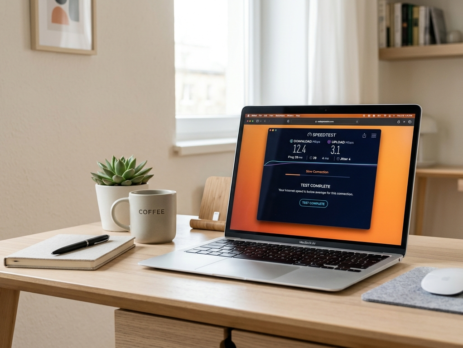
How to Actually Test Your Real Speed
Most people test incorrectly.
Do this instead:
- Use a trusted speed test (like Speedtest by Ookla)
- Test at different times (morning vs night)
- Use Ethernet for accurate results
- Disconnect other devices
This gives you a realistic picture of your connection.
How to Fix Your Slow Internet (Actionable Tips)
Now the important part—how to fix it 👇
✅ 1. Upgrade Your Router
- Get a WiFi 6 or WiFi 6E router
- Better speed handling
- Improved coverage
✅ 2. Use Ethernet for Important Tasks
For:
- Gaming
- Work calls
- Large downloads
👉 Wired = faster + stable
✅ 3. Position Your Router Correctly
- Place it in the center of your home
- Avoid walls and metal objects
- Keep it elevated
✅ 4. Limit Connected Devices
Too many devices = slower speeds
👉 Disconnect unused devices
👉 Use guest networks
✅ 5. Use a Mesh WiFi System
If your home is large:
- Mesh systems eliminate dead zones
- Provide consistent speed everywhere
✅ 6. Consider a VPN (for Throttling)
A VPN can:
- Prevent ISP throttling
- Encrypt your traffic
⚠️ Note: Can slightly reduce speed, but improves consistency
✅ 7. Upgrade Your Plan (Only If Needed)
Don’t blindly upgrade.
Ask:
- Are you hitting your current limit?
- Or is something else slowing you down?
The Truth About “Gigabit Internet”
Gigabit sounds impressive—but most users don’t actually need it.
Typical usage:
- Streaming: 25 Mbps
- Gaming: 50 Mbps
- Work: 100 Mbps
👉 300–500 Mbps is enough for most homes
Anything above that = diminishing returns unless you’re a power user.
So… Is Your Internet Really Lying?
Not exactly.
But it’s definitely misleading.
Between:
- “Up to” speeds
- Network congestion
- Hardware limitations
- Throttling
…you’re rarely getting what you think you’re paying for.
Conclusion
Your internet speed isn’t just about your plan—it’s a mix of technology, infrastructure, and hidden limitations.
The good news?
Once you understand the real reasons behind slow speeds, you can fix most of them.
🔑 Key Takeaways:
- Your ISP advertises maximum—not guaranteed—speed
- Your router and devices matter more than you think
- WiFi is often the biggest bottleneck
- Small changes can drastically improve performance
Final thought:
You don’t always need faster internet…
You just need smarter internet usage.

I am an enthusiastic tech blogger with 15 years of experience in the technology field. I am passionate about sharing valuable insights and helping people who are interested in technology gain useful and practical information. I am originally from Mumbai, India.